
New TeePublic sellers
Follow a clear preparation process for artwork, metadata, colors, and products.
PodPilot is a TeePublic automation tool that helps print-on-demand sellers prepare multiple designs, generate titles, tags and descriptions with AI, configure colors and products, and automate repetitive TeePublic upload tasks through a browser-based workflow.
 TeePublic preparation workspace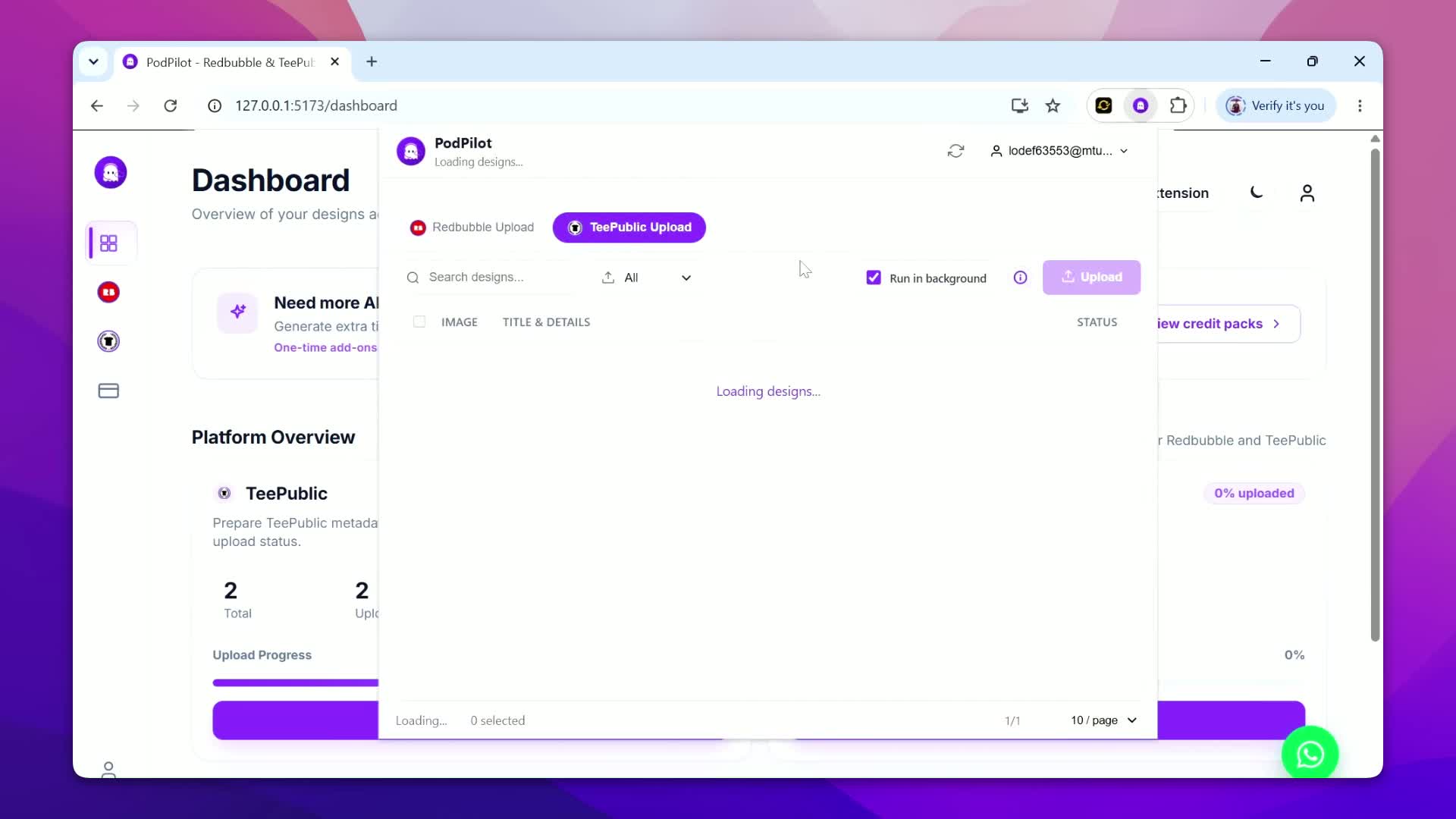
Manual TeePublic preparation repeats the same decisions: write a title and description, separate the main tag from supporting tags, then choose suitable products and colors. PodPilot puts that work in one dashboard so TeePublic upload automation begins with an organized, reviewable listing instead of a blank marketplace form.
Use the TeePublic upload tool to edit each design independently, reuse settings where they fit, and decide when the batch is ready. You can automate TeePublic uploads while keeping the final image, metadata, product selection, and color choices under seller control.
Import multiple PNG designs, organize them as a batch, prepare metadata before upload, and configure products and colors for each design. Ready listings move into the browser workflow while queue status shows what is waiting, processing, or complete.
PodPilot works as a TeePublic bulk uploader workflow with an emphasis on preparation. It adds AI listing drafts, centralized organization, reusable settings, and progress visibility for sellers who want to upload multiple designs to TeePublic without rebuilding every listing from scratch.
Read the TeePublic bulk upload guidePodPilot's TeePublic AI listing generator can draft a title, description, main tag, supporting tags, and related listing metadata. AI-powered TeePublic automation is especially helpful when a folder of artwork has no prepared copy and every blank listing slows the batch down.
Generated content remains editable before saving or uploading. Review every keyword for relevance, remove anything that does not describe the artwork, and keep the final decision. AI can reduce writing time, but it does not guarantee sales, search placement, or marketplace rankings.
Explore the AI listing generatorA five-step review path moves each design from a local file to a prepared TeePublic browser queue.
Upload or import PNG artwork into PodPilot and keep each file attached to its listing record.
Write metadata yourself or use AI to draft titles, descriptions, a main tag, and supporting tags.
Configure TeePublic product selections and color choices for the artwork you are preparing.
Check the image, title, description, tags, colors, and products before anything enters the queue.
Use the PodPilot Chrome extension to process prepared designs and track upload progress.
A TeePublic automation tool should account for more than metadata. PodPilot lets you choose available colors, turn product selections on or off, and review each design before upload. Product coverage stays part of preparation instead of a rushed final step.
Copy colors, products, or the full configuration from a prepared design, then paste those settings to one design or the prepared batch when they fit. You can still open designs independently, make exceptions, and save the current listing before the queue starts.

A TeePublic Chrome extension works inside the browser where you already manage your seller session. PodPilot keeps listing preparation in its dashboard, then passes reviewed queue data to the extension for supported form-filling and upload actions. This reduces repeated clicking while keeping the queue visible and preparation separate from the marketplace page.
Progress remains visible as prepared designs move through the browser workflow. PodPilot is an independent productivity tool. Sellers should review TeePublic's policies and use automation responsibly.
This comparison is about two working methods, not a comparison between PodPilot and TeePublic.
| Manual TeePublic Uploading | PodPilot |
|---|---|
| Edit designs one by one | Prepare designs in batches |
| Write metadata manually | Generate and edit metadata with AI |
| Repeat product and color settings | Copy and reuse prepared settings |
| Switch between files and tabs | Organize designs in one dashboard |
| Hard to track large batches | Follow progress from an upload queue |
| Repeat browser actions | Automate supported upload steps |
PodPilot suits sellers who want a visible preparation layer between a design folder and TeePublic.
Follow a clear preparation process for artwork, metadata, colors, and products.
Turn a large design folder into an organized, reviewed sequence.
Keep artwork matched to listing information and review status.
Draft metadata with AI, then edit it for the design.
Manage both supported marketplaces with separate workflows.
Consider a focused alternative to a broad multi-marketplace suite.
PodPilot focuses on the practical work around TeePublic and Redbubble: organize designs, prepare marketplace-specific metadata, reuse settings, review listings, and run a browser queue. The result is focused TeePublic automation software that is easier to learn than a tool built around marketplaces you never use.
Choose PodPilot when you want AI assistance and a browser-based process without a sprawling platform. Its focused scope supports more affordable positioning than broader multi-platform tools. Explore the broader TeePublic upload automation workflow, or compare supported approaches before choosing a plan. Sellers working across marketplaces can also review the Redbubble upload automation workflow.
Compare PodPilot with MerchGhost and Merch TitansClear answers about TeePublic preparation, bulk workflows, AI, colors, products, and browser uploads.
Visit the PodPilot help centerA TeePublic automation tool helps sellers prepare listings and reduce repeated browser work. PodPilot combines editable metadata, product settings, a queue, and a Chrome extension workflow.
PodPilot can automate supported upload actions after you prepare and review your listings. Sellers should review current TeePublic policies and use automation responsibly.
TeePublic offers its own bulk uploader. PodPilot lets you import designs, prepare AI-assisted metadata and settings, review listings, and process a browser queue.
PodPilot supports batch preparation and uploading with reusable settings, AI-assisted listing drafts, and visible queue progress. It does not claim to replace TeePublic's official bulk uploader.
Yes. PodPilot can draft titles, descriptions, a main tag, supporting tags, and related metadata. Every result remains editable before upload.
Yes. Choose available products and colors, then copy or paste those settings across prepared designs before upload.
No desktop uploader is required. Prepare listings in the web dashboard and run supported actions through the Chrome extension.
Yes. Review the artwork, metadata, colors, products, and prepared settings before starting the upload workflow.
Yes. PodPilot supports Redbubble and TeePublic with separate preparation and browser-based upload workflows for each marketplace.
No. PodPilot is an independent productivity tool for print-on-demand sellers and is not affiliated with or endorsed by TeePublic.
Prepare designs, generate listing metadata with AI, configure colors and products, and automate repetitive TeePublic upload tasks from one focused workflow.
No long-term commitment. Review your listings before uploading.